
35sites MicroApp · Outreach Pulse
Turn outreach into a focused daily habit.
Outreach Pulse helps you organize contacts, prepare personalized messages, avoid accidental duplicate sends, and keep a useful activity history—without adopting a complicated sales platform or another monthly subscription.
A Smaller, More Practical Approach
Outreach should not require a full CRM.
Sometimes you do not need territory management, forecasting, automation sequences, or an enterprise sales stack. You just need to know who to contact, what to say, and whether you already reached out.
- Stay organized: Keep leads, status, notes, and outreach history together.
- Move faster: Start with a reusable template and personalize the message before sending.
- Reduce mistakes: See recent activity and warnings before contacting someone again.
- Keep control: Store your working data locally and export it whenever you choose.
Built for Independent Work
Enough structure to keep moving. Not another system to manage.
Outreach Pulse is especially useful for consultants, freelancers, creators, small-business owners, job seekers, and others who handle their own relationship-based outreach.
It keeps the work visible without turning a straightforward task into a software-administration project.
See Outreach Pulse in Action
A quick look at the complete workflow.
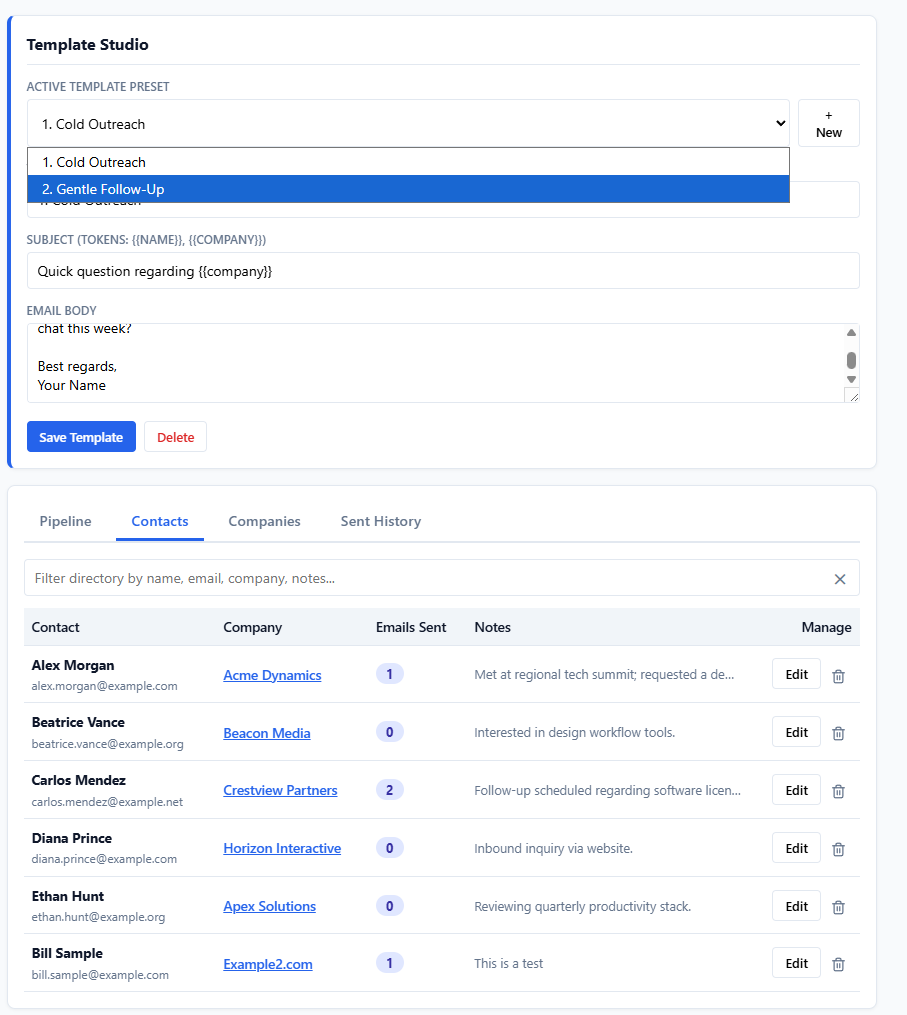
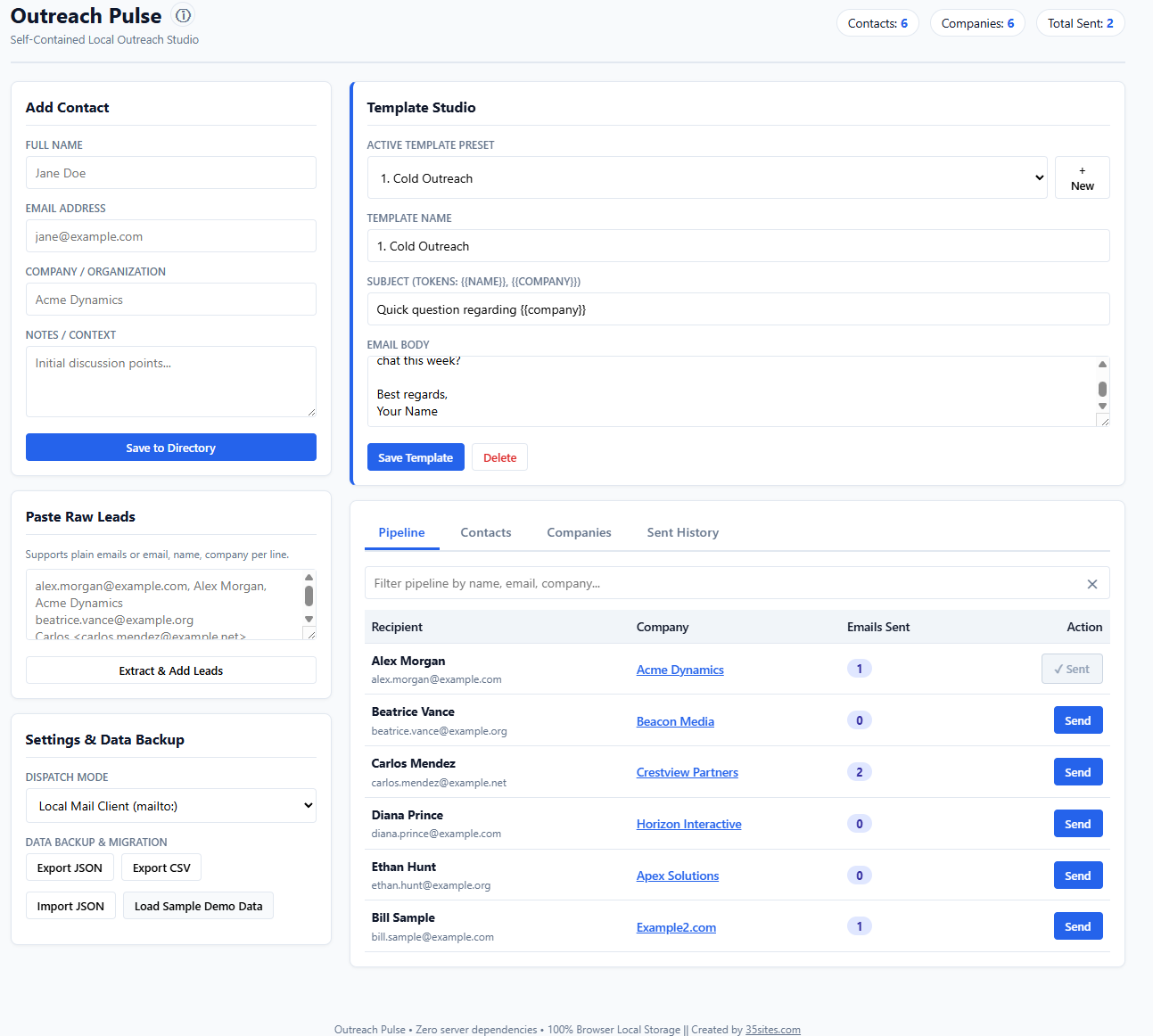
Show visitors how Outreach Pulse moves from an organized contact list to a personalized message and a useful activity record.
What It Helps You Do
A clear workspace for one-to-one outreach.
Everything is designed around a straightforward question: what do I need to do next?
Build a lead queue
Bring in a list of contacts, review what you have, and decide who should receive attention first.
Organize a simple pipeline
Track where each contact stands without configuring a complex sales system.
Create reusable templates
Save message templates and personalize them with fields such as {{name}} and {{company}}.
Prepare messages quickly
Generate a personalized message and open it in your default email application for review and sending.
Catch possible duplicates
Use recent-send warnings and preset safeguards to reduce accidental repeat outreach.
Review your history
See message text, timestamps, and activity counts so you have context before following up.
A Simple Daily Workflow
From lead list to a thoughtful message.
Import or add
Add contacts individually or bring in an existing lead list.
Choose your next contact
Use the queue and status information to focus on the right person.
Personalize the message
Select a template, review the merged details, and make it sound human.
Send and retain context
Open the message in your email workflow and maintain an activity record.
Clear Expectations
What Outreach Pulse is—and what it is not.
It is
- A focused workspace for personal, one-to-one outreach
- A lightweight lead queue and pipeline
- A reusable message-template library
- A local record of your outreach activity
- A standalone tool you can keep using without a subscription
It is not
- A lead-generation or data-enrichment service
- A bulk-email or automated marketing platform
- A replacement for consent, deliverability, or anti-spam compliance
- A cloud-synchronized team CRM
- A promise that every message will receive a response
Privacy by Architecture
Your working data stays in your browser.
Outreach Pulse does not require a 35sites account and does not store your contact records in a centralized 35sites database. Your leads, templates, settings, and activity history are stored locally in the browser profile where you use the application.
You can create a JSON backup of your application data and export supported tables to CSV, giving you a practical way to protect or move your information.
Important: Local does not mean encrypted. Browser storage and exported files depend on the security of your computer, browser profile, extensions, and backup location. Make regular backups and protect them appropriately.
What You Receive
One download. No monthly bill.
- Outreach Pulse: The complete standalone HTML application.
- Getting-started guide: Clear instructions for opening, using, and backing up the app.
- Sample data: A safe way to explore the workflow before adding your own information.
- Product updates: Updates to the purchased version without a recurring subscription fee.
Frequently Asked Questions
Before you get started.
Do I need to install anything?
No. Outreach Pulse is delivered as a standalone HTML file. Save it to your computer and open it in a supported modern desktop browser.
Does Outreach Pulse send email by itself?
Its simplest workflow prepares the personalized message and opens it in your default email application using a mail link. Any supported external delivery connection requires internet access, separate configuration, and an account with that provider.
Can I use it offline?
Core functions such as managing contacts, editing templates, reviewing history, and creating local email links can work offline. Internet access is required to download the product, actually send email, or use an external delivery service.
Where is my data stored?
Your working data is stored in the local storage of the browser profile you use. It does not automatically sync between browsers or computers, and it can be removed if you clear the browser’s site data. Regular JSON backups are strongly recommended.
Can I move the app to another computer?
Yes. Move the HTML application file, then use JSON backup and restore to transfer your application data. CSV exports are also available for supported tables.
Is this designed for bulk email campaigns?
No. Outreach Pulse is designed for deliberate, personalized outreach. It is not a bulk-email engine, automated sequence platform, or substitute for following applicable consent and anti-spam requirements.
Which browsers are supported?
Outreach Pulse is intended for current desktop versions of Chrome, Edge, Firefox, and Safari. Test the demo in the browser you expect to use before purchasing.
What happens when an update is released?
Buyers will be notified when an update to the purchased version is available. Because your working information is separate from the original download, follow the included upgrade and backup instructions before moving to a newer file.
Make Outreach Manageable
Know who to contact, what to say, and what happened last time.
Outreach Pulse gives independent professionals a focused way to keep outreach moving—without another platform to manage.

